> ## Documentation Index
> Fetch the complete documentation index at: https://docs.heystandard.com/llms.txt
> Use this file to discover all available pages before exploring further.
# Overview
> What setup asks for and what you'll have when you're done
Setup is five short steps. Fill in what you can and the system uses it to generate your first schedule. You can edit any input later.
## What you'll have at the end
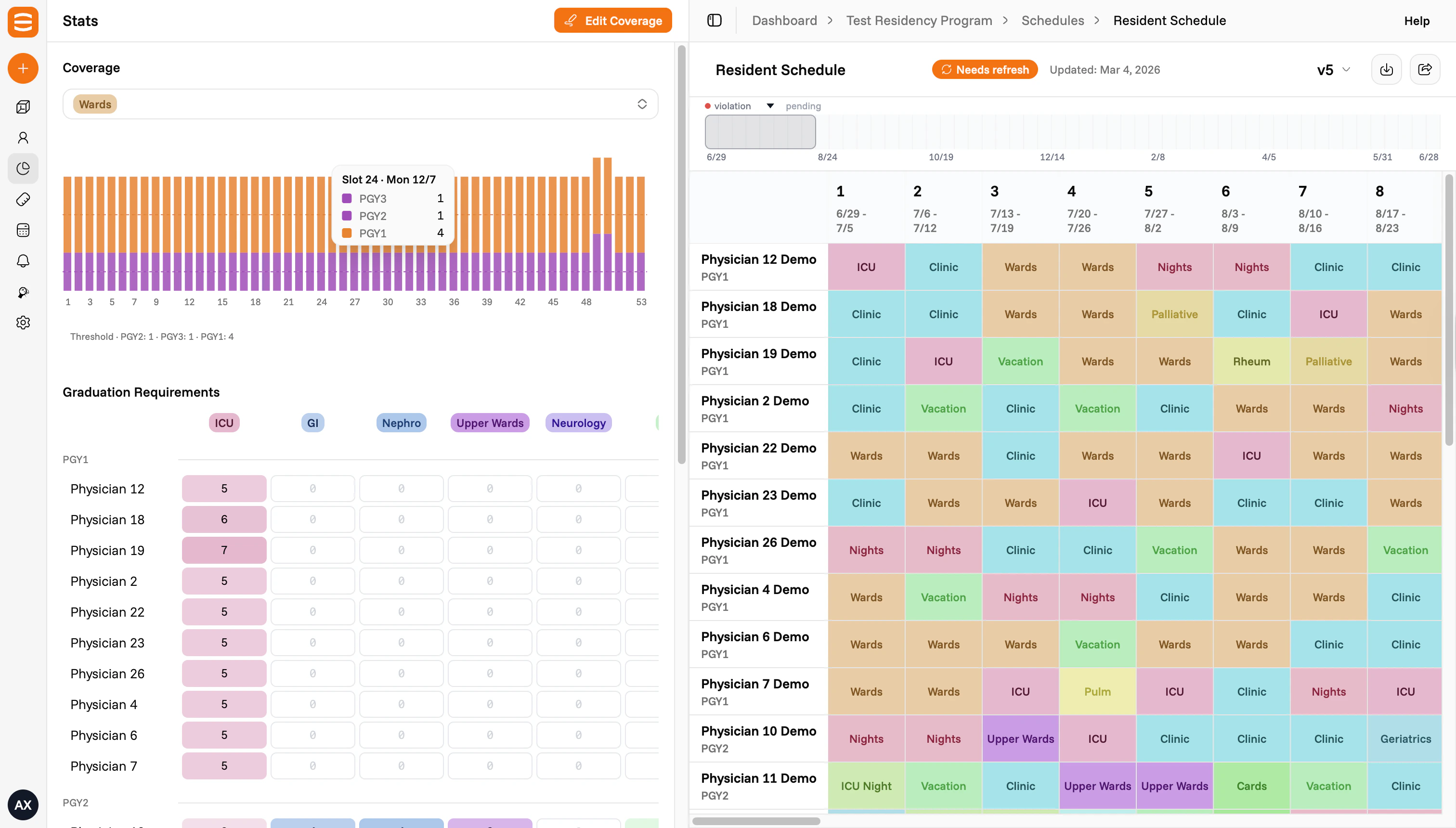
A generated [block schedule](/reference/schedule-types) for your team that respects your [rules](/make-your-first-schedule/2-rules). From there you can view it on [the table](/view-your-schedule/the-table), read [alerts](/view-your-schedule/alerts), [regenerate](/update-your-schedule/edit-and-regenerate), or link a [call schedule](/view-your-schedule/call-schedules).
 ## What to gather before you start
You don't need everything to begin, but having these on hand makes setup faster:
* The [people](/reference/people) on your team, with their ranks (e.g. PGY1 to PGY4)
* The [blocks](/reference/blocks) or rotations you schedule (e.g. Wards, Clinic, Nights, Leave)
* Rules your team already follows (e.g. coverage per block, mandates per person, call frequency, weekend rotation, [leave policy](/reference/leave))
* A past schedule in any format, if you have one
## The five steps
### The basics
Schedule name, team name, specialty, facility, start and end dates, slot size, statutory leave days, your physicians, and your blocks.
See [The basics](/make-your-first-schedule/1-basics).
### Rules
Plain-language rules for how the schedule should behave. Coverage (how many people per block) and mandates (minimum times each person hits a block) are kinds of rules. Examples: "no back-to-back call", "spread weekends fairly", "max two nights per month."
See [Rules](/make-your-first-schedule/2-rules).
### Outside rotators
Visiting residents or other [rotators](/reference/rotators) who share blocks with your team but aren't on your roster.
See [Outside rotators](/make-your-first-schedule/3-rotators).
### Past schedules
A prior schedule you can upload so the system matches the patterns your team is used to. Helpful but not required.
See [Past schedules](/make-your-first-schedule/4-past-schedules).
### Who's who
The director, chiefs, and coordinators who run scheduling.
See [Who's who](/make-your-first-schedule/5-who-is-who).
## Tips
* **Fill in what you have.** Setup captures the starting state. You can update any input after the schedule is generated and regenerate.
* **Take your time on Rules.** Rules drive most of how the schedule behaves.
* **No past schedule? Skip that step.** It helps the system learn your patterns, but it isn't required.
## What to gather before you start
You don't need everything to begin, but having these on hand makes setup faster:
* The [people](/reference/people) on your team, with their ranks (e.g. PGY1 to PGY4)
* The [blocks](/reference/blocks) or rotations you schedule (e.g. Wards, Clinic, Nights, Leave)
* Rules your team already follows (e.g. coverage per block, mandates per person, call frequency, weekend rotation, [leave policy](/reference/leave))
* A past schedule in any format, if you have one
## The five steps
### The basics
Schedule name, team name, specialty, facility, start and end dates, slot size, statutory leave days, your physicians, and your blocks.
See [The basics](/make-your-first-schedule/1-basics).
### Rules
Plain-language rules for how the schedule should behave. Coverage (how many people per block) and mandates (minimum times each person hits a block) are kinds of rules. Examples: "no back-to-back call", "spread weekends fairly", "max two nights per month."
See [Rules](/make-your-first-schedule/2-rules).
### Outside rotators
Visiting residents or other [rotators](/reference/rotators) who share blocks with your team but aren't on your roster.
See [Outside rotators](/make-your-first-schedule/3-rotators).
### Past schedules
A prior schedule you can upload so the system matches the patterns your team is used to. Helpful but not required.
See [Past schedules](/make-your-first-schedule/4-past-schedules).
### Who's who
The director, chiefs, and coordinators who run scheduling.
See [Who's who](/make-your-first-schedule/5-who-is-who).
## Tips
* **Fill in what you have.** Setup captures the starting state. You can update any input after the schedule is generated and regenerate.
* **Take your time on Rules.** Rules drive most of how the schedule behaves.
* **No past schedule? Skip that step.** It helps the system learn your patterns, but it isn't required.