> ## Documentation Index
> Fetch the complete documentation index at: https://docs.heystandard.com/llms.txt
> Use this file to discover all available pages before exploring further.
# Set up your schedule for the app
> Enable a schedule in the app and keep it up to date
A resident's calendar is built from your **published** schedule, and only once you've enabled that schedule for the app. So two things have to be true before residents see their shifts: it's published, and it's enabled in the app.
## Get the schedule ready to publish
The app only fills in calendars for [people](/reference/people) who are on the schedule. Add every resident you want on the app, and set their email. That email is how their invite reaches them.
Events in the app need a time of day. For each [block](/reference/blocks), set its shift times: the start and end for each weekday it runs. A block with no shift times falls back to a **9:00 AM to 5:00 PM** event, which is rarely what you want.
Overnight and on-call windows, where the end time is earlier than the start, are handled for you. The event carries over to the next morning instead of collapsing.
Publishing builds from the **last saved version**, not your in-progress edits. If the header shows unsaved changes, save first, or those edits won't reach anyone's app.
## Enable the schedule in the app
Everything residents see lives behind the **Publish** button in the schedule header. Open it to publish and to turn the app on.
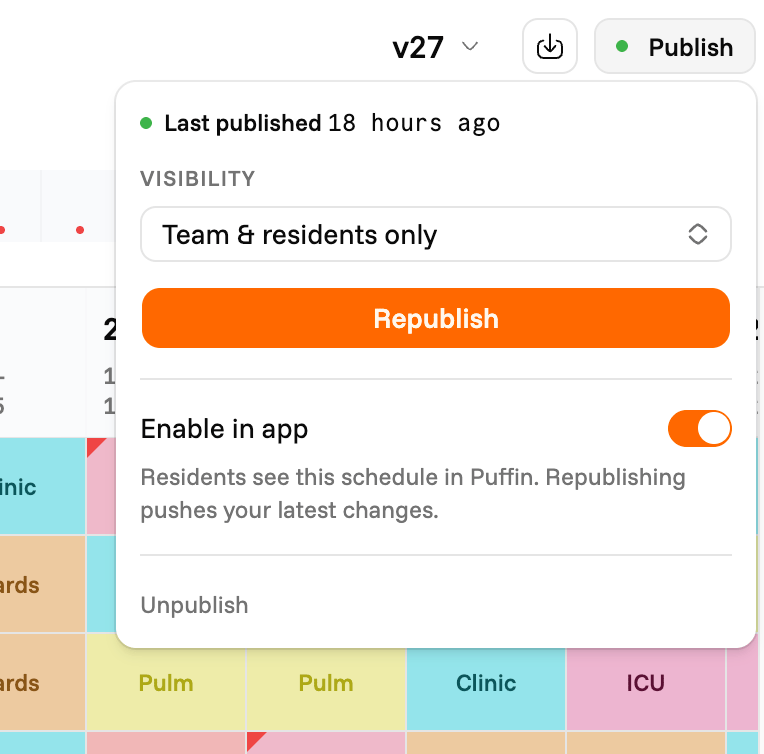 Click **Publish** in the schedule header. Choose who can view it under **Visibility** (your team and linked residents, or anyone with the link), then click **Publish**. See [Publish](/view-your-schedule/publish) for what visibility means.
In the same popover, switch on **Enable in app**. This pushes each linked resident's assignments to their Puffin calendar, expanded day by day from your shift times. The switch takes effect the moment you flip it.
**Enable in app** is off until you turn it on, and you can only turn it on once the schedule is published. A published schedule is visible to your team on the web whether or not the app is on. The app is a separate switch.
## Keep the app up to date
Once a schedule is enabled, **Republish** keeps the app in sync. Whenever you change the schedule, save it and click **Republish**, and every linked resident's calendar updates. There's no separate "push to app" step.
New residents are handled for you too. When someone links their account, their calendar fills in right away from the published schedule. You don't need to republish each time a resident joins.
## Turning the app back off
Switch **Enable in app** off and the schedule stops syncing to phones. Shifts already on residents' calendars stay put, so nobody's calendar suddenly empties. Future changes simply won't reach the app until you turn it back on, at which point the next republish catches everyone up.
## What residents see once it's on
* One event per working day of each assignment, titled with the rotation or block.
* Times drawn from the block's shift times, or 9 to 5 where none are set.
* A stable color per rotation, so the same rotation always looks the same.
* Everything in the **schedule's timezone**, until the resident picks a different display timezone on their device.
## When a resident's calendar is empty
| What they see | Why | Fix |
| ----------------------- | ------------------------------------------------- | -------------------------------------------------------------------------- |
| No shifts at all | The schedule isn't enabled in the app | Turn on **Enable in app** in the Publish popover |
| No shifts at all | The schedule was never published | [Publish](/view-your-schedule/publish) it, then enable the app |
| No shifts at all | They aren't on the schedule, or aren't linked yet | Add them, or send their [invite](/puffin-for-residents/inviting-residents) |
| Shifts all show 9 to 5 | The block has no shift times set | Set shift times on the block |
| Missing a recent change | The change wasn't saved before republishing | Save, then **Republish** |
## Next steps
* [Inviting residents](/puffin-for-residents/inviting-residents)
Click **Publish** in the schedule header. Choose who can view it under **Visibility** (your team and linked residents, or anyone with the link), then click **Publish**. See [Publish](/view-your-schedule/publish) for what visibility means.
In the same popover, switch on **Enable in app**. This pushes each linked resident's assignments to their Puffin calendar, expanded day by day from your shift times. The switch takes effect the moment you flip it.
**Enable in app** is off until you turn it on, and you can only turn it on once the schedule is published. A published schedule is visible to your team on the web whether or not the app is on. The app is a separate switch.
## Keep the app up to date
Once a schedule is enabled, **Republish** keeps the app in sync. Whenever you change the schedule, save it and click **Republish**, and every linked resident's calendar updates. There's no separate "push to app" step.
New residents are handled for you too. When someone links their account, their calendar fills in right away from the published schedule. You don't need to republish each time a resident joins.
## Turning the app back off
Switch **Enable in app** off and the schedule stops syncing to phones. Shifts already on residents' calendars stay put, so nobody's calendar suddenly empties. Future changes simply won't reach the app until you turn it back on, at which point the next republish catches everyone up.
## What residents see once it's on
* One event per working day of each assignment, titled with the rotation or block.
* Times drawn from the block's shift times, or 9 to 5 where none are set.
* A stable color per rotation, so the same rotation always looks the same.
* Everything in the **schedule's timezone**, until the resident picks a different display timezone on their device.
## When a resident's calendar is empty
| What they see | Why | Fix |
| ----------------------- | ------------------------------------------------- | -------------------------------------------------------------------------- |
| No shifts at all | The schedule isn't enabled in the app | Turn on **Enable in app** in the Publish popover |
| No shifts at all | The schedule was never published | [Publish](/view-your-schedule/publish) it, then enable the app |
| No shifts at all | They aren't on the schedule, or aren't linked yet | Add them, or send their [invite](/puffin-for-residents/inviting-residents) |
| Shifts all show 9 to 5 | The block has no shift times set | Set shift times on the block |
| Missing a recent change | The change wasn't saved before republishing | Save, then **Republish** |
## Next steps
* [Inviting residents](/puffin-for-residents/inviting-residents)