> ## Documentation Index
> Fetch the complete documentation index at: https://docs.heystandard.com/llms.txt
> Use this file to discover all available pages before exploring further.
# Alerts
> Information about your schedule that you should pay attention to
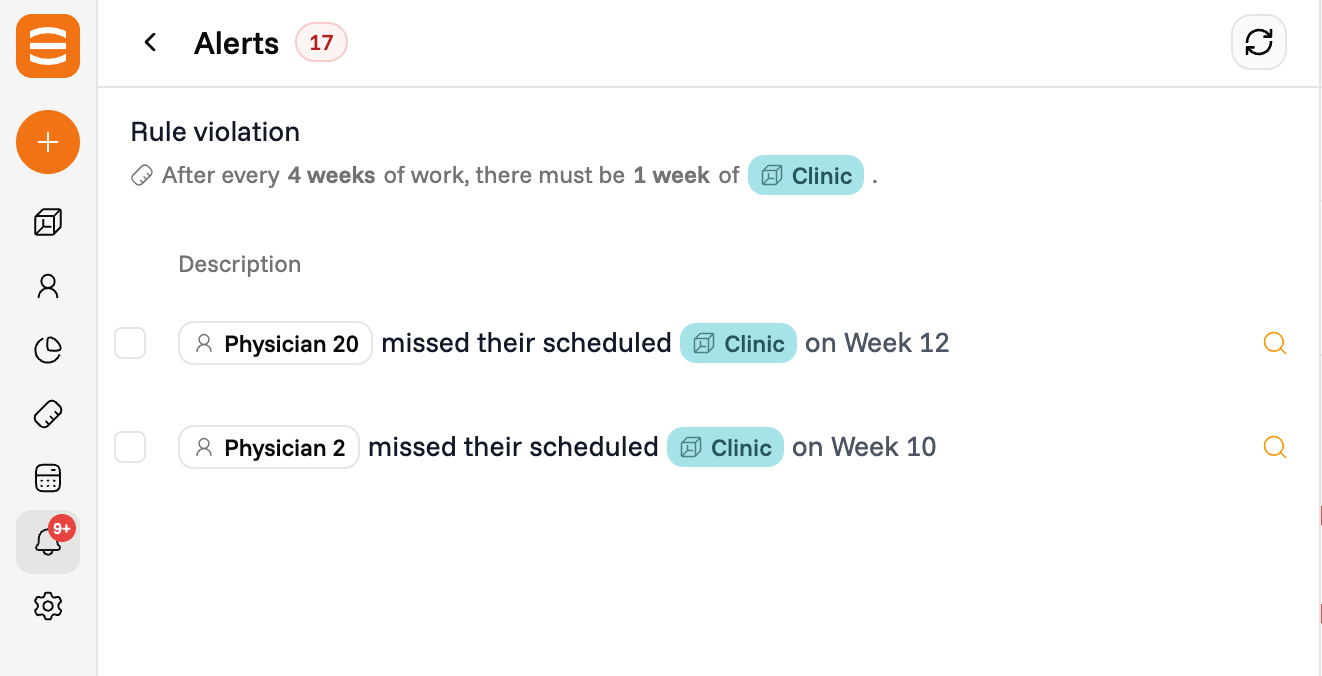
Alerts are information about your schedule that you should pay attention to. They mainly contain rule violations: places where the current assignments break a rule you set in [Rules](/make-your-first-schedule/2-rules).
Alerts refresh every time you save a [schedule edit](/update-your-schedule/edit-and-regenerate).
## What you can do with an alert
### See the violations
Click into an alert to view the list of violations of that rule. Each entry tells you which person, block, or time slot is involved.
### Highlight violations on the schedule
Click the **highlight** button (magnifying glass icon) next to an alert. The schedule table marks every cell where the violation occurs with a red dog-ear in the corner.
 ### Fix a violation manually
Click on a cell with a red dog-ear to fix the violation by hand. See [Manual edits](/update-your-schedule/manual-edits) for how cell edits work.
### Hide an alert
Click the **eye** button on an alert to hide it. The violation disappears from the schedule table and the alert is no longer counted in the violations chart.
### Fix a violation manually
Click on a cell with a red dog-ear to fix the violation by hand. See [Manual edits](/update-your-schedule/manual-edits) for how cell edits work.
### Hide an alert
Click the **eye** button on an alert to hide it. The violation disappears from the schedule table and the alert is no longer counted in the violations chart.