> ## Documentation Index
> Fetch the complete documentation index at: https://docs.heystandard.com/llms.txt
> Use this file to discover all available pages before exploring further.
# Schedule table
> Read the schedule, spot violations, navigate the chart
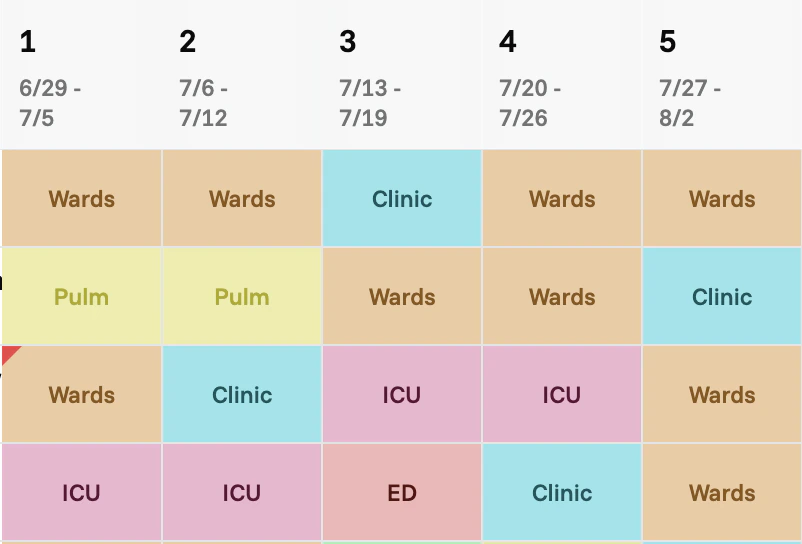
The schedule table is where you'll spend most of your time. Rows are people, columns are time slots, cells are assignments.
## Color-coded blocks
Block types are color-coded so you can see the structure of the schedule at a glance. Each block (Wards, Clinic, Nights, Vacation, etc.) has its own color, applied to every cell where that block is assigned.
 ## Violations chart
At the top of the table, you'll see a chart showing where rule violations occur across the schedule. The chart spans the same time range as the table below, so you can scan to see which weeks or blocks have problems and where they cluster.
## Violations chart
At the top of the table, you'll see a chart showing where rule violations occur across the schedule. The chart spans the same time range as the table below, so you can scan to see which weeks or blocks have problems and where they cluster.
 To understand what each violation means and how to act on it, see [Alerts](/view-your-schedule/alerts).
## Annotate with labels
You can add short, colored annotations to a person's slot range — for example to mark "Boards prep" weeks or "Backup" stretches that aren't part of the rotation structure. See [Labels](/view-your-schedule/labels).
## Export
To download the schedule as an Excel file, see [Export](/view-your-schedule/export).
To understand what each violation means and how to act on it, see [Alerts](/view-your-schedule/alerts).
## Annotate with labels
You can add short, colored annotations to a person's slot range — for example to mark "Boards prep" weeks or "Backup" stretches that aren't part of the rotation structure. See [Labels](/view-your-schedule/labels).
## Export
To download the schedule as an Excel file, see [Export](/view-your-schedule/export).