

Create and edit labels
- Select cells on the schedule grid for one person — a contiguous range across consecutive slots.
- Click the label button in the selection action bar at the bottom of the screen.
- The label editor opens.
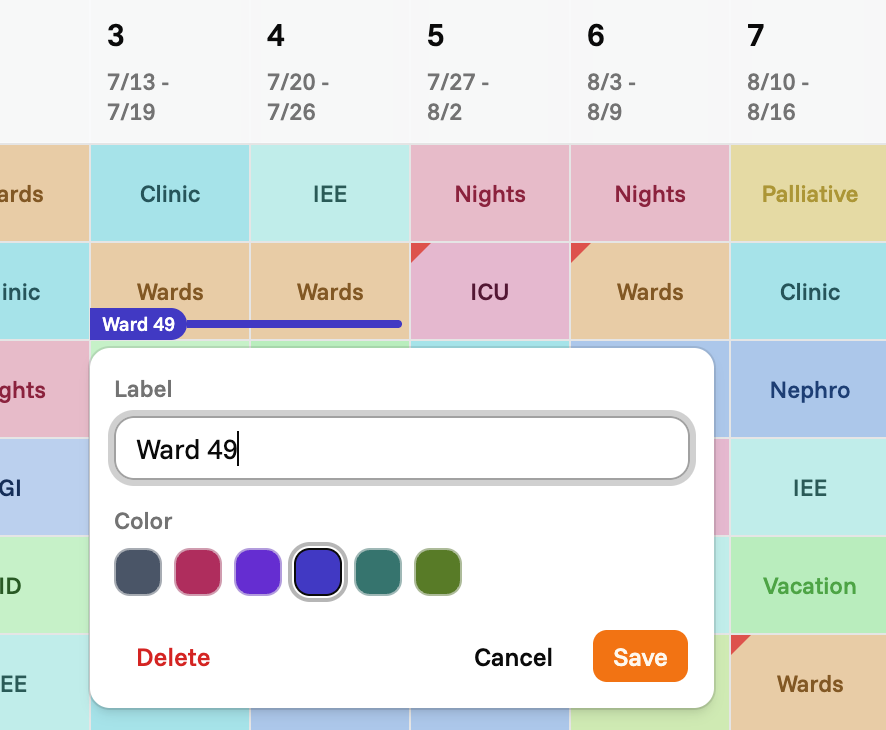
- Label — the text shown on the badge.
- Color — pick one of six colors. The selected swatch has a ring around it.
- Save writes the label to the schedule.
- Delete removes the label. Only shown when you’re editing an existing label.
Label multiple people at once
When you select a rectangular range that spans more than one person, the label button opens a bulk editor with one row per person. Each person can have their own label text on the same slot range, and all rows are saved together in a single operation.Labels and the schedule
- Labels are saved per schedule and shared across everyone viewing it.
- They are immutable-versioned: each save creates a new version, so a conflicting concurrent edit surfaces a reload prompt rather than silently overwriting.
- Labels do not affect rule violations, alerts, or solver behavior. They are purely an annotation layer.